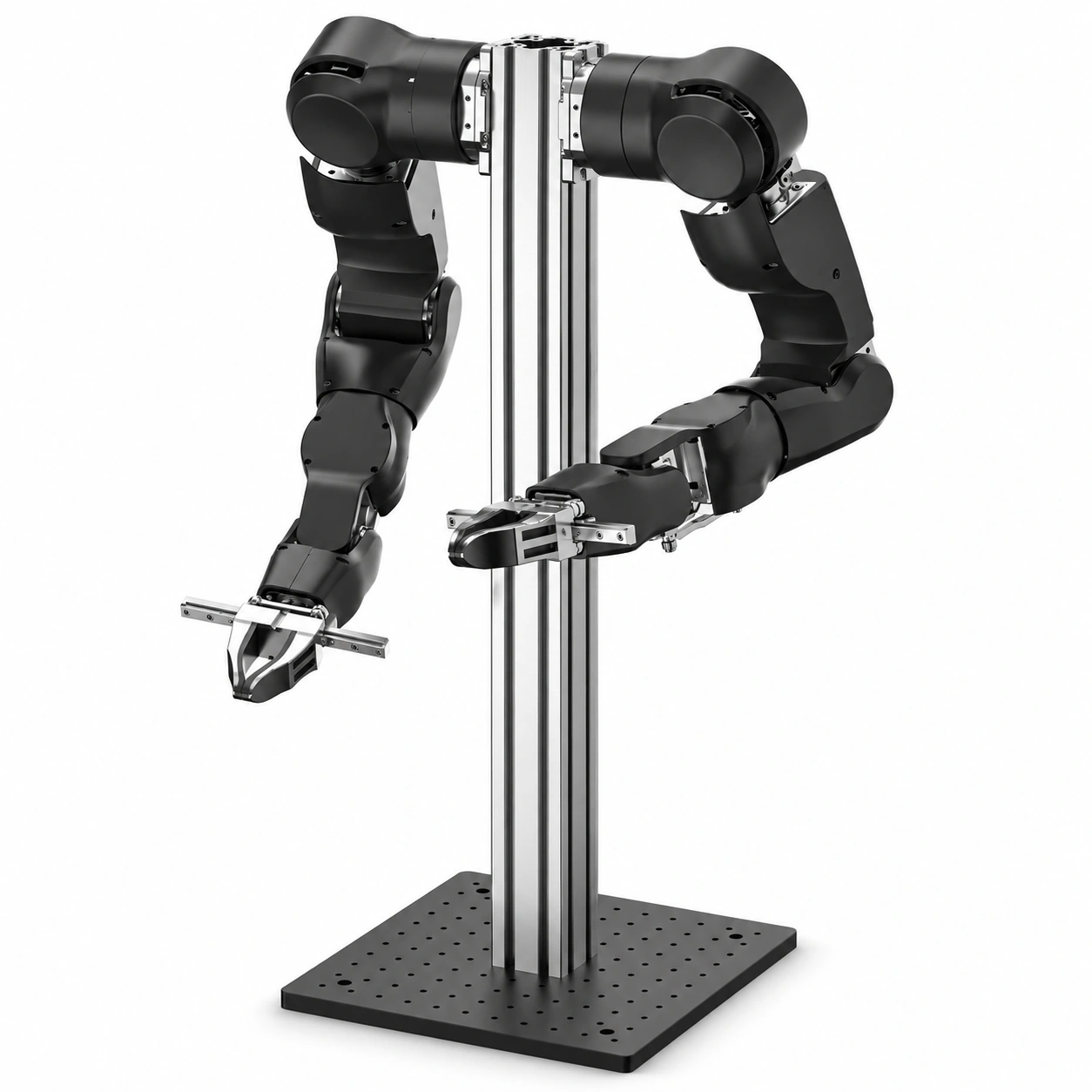
Choose a dual-arm robot setup by the relationship between the two tools, the shared workspace and the way the system coordinates motion. Two arms on a bench do not automatically form a coordinated manipulation system.
For buyers planning bimanual manipulation research, this guide turns a task description into hardware, integration and acceptance requirements. It also explains where XTIVOR's XTR-A700 can enter a shortlist and which details still need confirmation in a quotation.
Start with what each arm must do
Bimanual robot manipulation uses two arms in a task where their actions are related. The relationship may be sequential, such as passing an object, or simultaneous, such as supporting the same object at two points.
Describe the task before selecting a robot. Identify what each gripper touches, when it moves and what information permits the next step. This separates a two-arm requirement from a task that could use one arm and a fixed fixture.
| Task pattern | Example development task | Main selection question |
|---|---|---|
| One arm holds, the other acts | Stabilize a part while the other tool approaches it | Can both tools reach the required poses without interference? |
| Object handover | Transfer a part from one gripper to the other | How will the system confirm the receiving grasp before release? |
| Shared-object movement | Reorient an object held at two contact points | How will relative tool pose and load sharing be managed? |
| Separate actions in one workspace | Move two parts toward a common assembly area | How will trajectories and access to shared space be coordinated? |
These are task-planning examples, not demonstrations already validated on XTR-A700. For the hardware shortlist, see bimanual manipulation applications.
Check the shared workspace, not just arm span
Draw both base positions, mounting orientations, tools, fixtures and camera supports. Mark pickup, handover, working and withdrawal poses. The useful shared workspace is the region where both tools can achieve the required positions and orientations with clearance for their links and accessories.
A large arm-span figure does not prove that a particular handover pose is reachable. Nor does a single-arm reach diagram establish how two installed arms interact. Check elbow placement, joint limits, gripper opening and cable paths through the complete sequence.
When using a planning system, represent both arms and relevant surroundings in the model. MoveIt's planning-scene documentation describes collision and constraint checking against a robot model and scene. It illustrates an integration requirement, not a claim that XTR-A700 ships with a configured planner or automatic collision avoidance.
Evaluate XTR-A700 against the task
XTR-A700 is the catalog candidate associated with XTIVOR's bimanual application range. Use the following facts to start a discussion, then request the delivered configuration and applicable operating conditions.
| Catalog item | XTR-A700 | What to confirm for a dual-arm project |
|---|---|---|
| Degrees of freedom | 7 per arm | Geometry, joint limits and available control modes |
| Maximum payload | Up to 5 kg per arm | Tool mass, load offset and limits at the working pose |
| Weight | 6 kg per arm | Mounting structure and complete installed assembly |
| Arm span | 1,596 mm | Installed geometry and usable shared workspace |
| Communication | CAN FD | Command protocol, host interface and coordination support |
| Price | Price on request | Whether the quotation covers one arm, two arms or a complete system |
The 1,596 mm figure is labeled arm span, not single-arm reach. The product illustration shows a dual-arm assembly; it does not define the contents of every order. Review the A700 installation drawing and obtain an itemized package list.
The extra joint can provide posture choices for suitable tasks, but does not itself provide coordination between two arms. The six-axis versus seven-axis guide covers that separate kinematic decision.
Treat payload and tooling as a combined problem
Account for each gripper, adapter, sensor and cable load as well as the object. State the tool center of gravity and how far the load acts from the wrist. Compare the complete trajectory with the applicable limits rather than selecting from the maximum payload number alone.
Do not turn two 5 kg per-arm figures into a guaranteed 10 kg cooperative payload. The force on each arm depends on the grasp geometry, object pose, motion and control behavior. For shared-object tasks, ask how loads and relative tool motion will be evaluated.
Tooling can change the hardware choice. A gripper that holds a part securely may obstruct the receiving gripper during a handover. Check jaw travel, contact surfaces, object visibility and whether the available sensing can confirm the required grasp state. The payload and reach guide provides a starting requirements list.
Separate simultaneous commands from coordinated motion
Sending a movement command to each arm does not establish synchronized execution. Ask how commands are scheduled, how actual joint states are reported, and what the system does if one arm is delayed, faults or stops.
For a sequential handover, coordination may be expressed as task states and conditions. For shared-object motion, the requirement also includes the relationship between the tools while both are moving. State which behavior your application needs before asking whether a controller supports it.
MoveIt's dual-arm tutorial shows that a multi-arm configuration requires distinct joint names, planning groups, end effectors, kinematics and controllers. This is a useful illustration of the software work involved. CAN FD in a catalog is not evidence of a ready-made ROS 2, MoveIt or bimanual-control integration.
Define calibration and observation requirements
Both arms need a consistent description of their base and tool frames for tasks that relate their poses. If cameras guide the task, include the camera-to-system relationship and verify it with representative object positions. Mounting or tooling changes can require the relevant calibration to be checked again. MoveIt's hand-eye calibration tutorial illustrates camera-to-robot calibration for fixed and wrist-mounted cameras.
Choose camera views around the task. A handover can hide the object behind a gripper; a wrist camera may lose the wider scene. Review the observations during approach, contact and release, not just at the starting pose.
For robot-learning projects, define how observations, arm states and commands are recorded together. The ALOHA research project combines a purpose-built bimanual teleoperation setup with demonstration learning. Its results belong to that system and research procedure; they do not establish ALOHA or ACT compatibility for XTIVOR hardware. Use the teleoperation data-collection checklist to plan the recording workflow.
Use a representative task as an acceptance test
Consider a hypothetical bench handover: the left gripper picks up a part, presents it in the shared workspace, and releases only after the receiving grasp is confirmed. The right arm then places it in a target fixture.
Before selecting hardware, define the parts, starting positions, grasp-confirmation method and placement tolerance. Agree how failed picks, incomplete grasps, timeouts and interruptions are handled. Record the full task outcome and reasons for failure rather than showing only successful motion segments.
A practical evaluation progresses from verified geometry and individual-arm operation to a controlled two-arm sequence and then repeated trials. Set the test conditions and pass criteria for your project; no universal success rate follows from the number of arms or joints.
Request a complete dual-arm quotation
Send XTIVOR the task sequence, object and tool details, proposed layout and expected quantities. Ask the quotation to separate:
- Arms and the number of units supplied.
- Grippers, adapters, mounting structure and cable management.
- Controllers, power equipment, cables and interfaces.
- Available documentation, software access and integration responsibilities.
- Calibration, commissioning or task validation, where agreed.
- Prototype and volume pricing, availability, delivery terms and lead time.
Define whether “quantity one” means one arm or one complete dual-arm setup. That clarification makes comparisons between quotations more useful.
Frequently asked questions
Is any pair of robot arms suitable for bimanual manipulation?
No. Geometry, tooling, control access and task coordination must be evaluated together. Two independently working arms may still lack the interface or workspace needed for your task.
Does the A700 illustration mean the quoted package includes two arms?
Confirm the package contents explicitly. An illustration is not an itemized quotation.
Can I start with teleoperation and add autonomous operation later?
That can be a project plan, but confirm recording access, observations, calibration and software responsibilities early. Demonstration capture alone does not deliver a validated autonomous task.
Plan your bimanual setup with XTIVOR
Review XTR-A700, then prepare a bimanual project inquiry. Email jennie@xtivor-robot.com with your layout, task sequence and purchase quantities for configuration-specific pricing.